.png)
Approve or reject a workspace request
You need specific permissions within the relevant workspace category to create a workspace and also to approve or reject requests for new workspaces.
If you have the permission to create workspaces within a specific workspace category, new workspace requests from colleagues with respect to that category will be addressed to you.
A new workspace request is automatically sent in the form of an email message to all users with workspace creation permissions within the relevant category.
-
Open the email message.
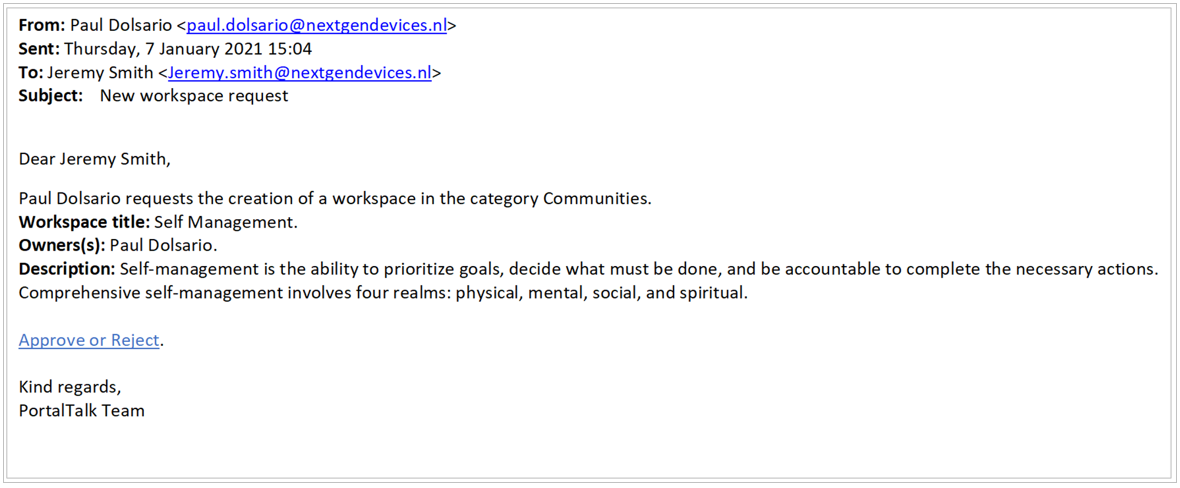
The text of these email messages can be set/modified by the PortalTalk application administrator.
If necessary, refer to the manual page related to managing the PortalTalk email templates.
-
Click Approve or Reject.
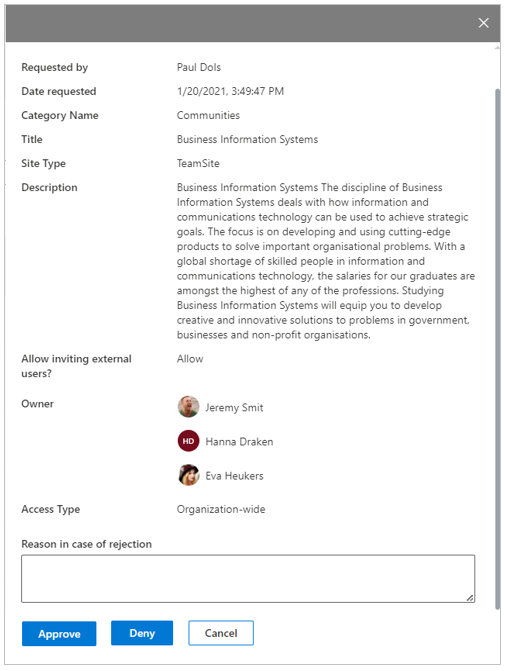
In a new browser tab, a form opens within the PortalTalk web interface, containing details of the requested workspace:
-
Click on Approve to create the requested workspace.
-
Or click Deny to reject the workspace request.
In the event of rejection, you can state the reason, which will then also be sent back to the requester in an email message.